Most businesses meet AI through a website: you type a question, it goes to someone else’s servers, and an answer comes back. That works for a lot of tasks. But when the work involves your customer list, your pricing, and your invoices, sending it all to a cloud service isn’t always comfortable. A local AI server for business takes a different approach: the AI runs on hardware you own, inside your building, and your data stays there.
Until recently, that kind of setup was out of reach for small companies. Today, capable open AI models run well on a single business-grade computer with a good graphics card. That opens the door to something new: running real parts of your business, not just one-off questions, on AI you fully control.
What a local AI setup can do for a business
A local AI server isn’t just a private chatbot. Connected to the systems you already use, it can take on real, repetitive work:
- Research and prospecting. Read public records and company websites, then pull out the details that matter, such as services, equipment, locations, and industry, so your sales team starts with a qualified list instead of a blank spreadsheet.
- Lead qualification. Score prospects against criteria you define and add the good ones to your CRM with a short research brief, without creating duplicates.
- First-contact drafting. Draft personalized emails grounded only in verified facts, then book calls for your salesperson and log replies.
- Back-office work. Prepare quotes and invoices, match incoming payments, and flag overdue accounts.
- Answering questions about your own data. Search internal documents, procedures, and records, all without that information leaving your network.
The key is that a person stays in charge. Anything customer-facing or involving money can start as an approval request that someone reviews with a single tap.
Why run a local AI server for business instead of the cloud
Privacy. Customer records, financial data, and internal documents never leave the building. Only the things you choose to send out, like an approved email, go anywhere.
Predictable cost. Cloud AI is usually billed by usage, and work like reading thousands of pages adds up. With a local server, the hardware is a one-time investment and the cost per task is effectively zero.
Control and traceability. You decide which model runs, when it’s updated, and what instructions it follows. The model and version can be recorded on every result, so any output can be traced and re-run. That matters when AI is helping with sales and billing decisions.
Works with what you already use. A local AI server can connect to your CRM or ERP, email, calendar, and chat tools, so it fits into how your team already works.
What a typical setup looks like
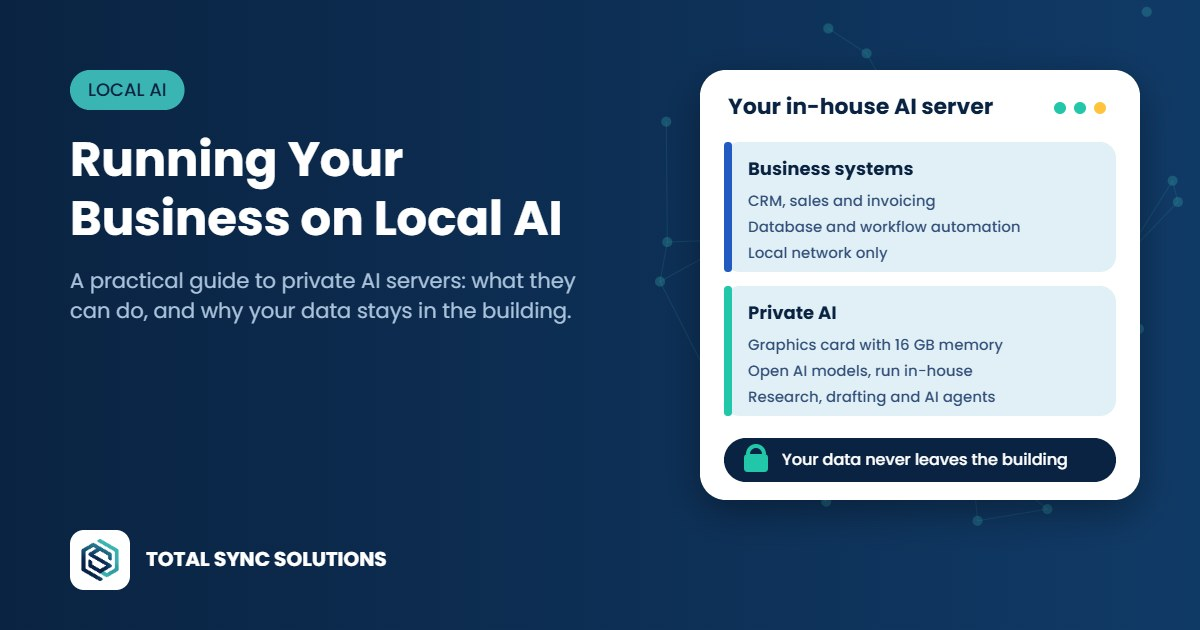
You don’t need a data center. A common design is one on-premises server split into two virtual machines:
- A business machine that runs your operations software, such as CRM, invoicing, and accounting, along with a database and workflow automation. It’s reachable on your local network only.
- An AI machine with a capable graphics card, for example 16 GB of graphics memory, running open models through a tool like Ollama. Smaller models handle reading and extraction; larger ones handle conversation and drafting.
Remote access goes through a secure, private connection, so nothing is exposed to the public internet.
Lessons we’ve learned building local AI systems
Test models on your own data. Bigger isn’t automatically better. We’ve seen a mid-sized model running on a single consumer graphics card outperform larger models at pulling facts out of business documents. Benchmarks are a starting point; your own data is the real test.
Watch the hardware, not just the software. A routine system update can quietly disconnect the graphics card from the AI software. Everything keeps working, just many times slower, because the model falls back to the main processor. Simple automatic checks that confirm the AI is running on the GPU before each job prevent that kind of silent slowdown.
Start with a human in the loop. Every customer email and every payment action should begin as an approval request. Automation is earned: approvals can relax as the system builds a track record of correct decisions. That’s how you get the speed of AI without betting the business on it.
Make the AI show its work. Requiring every extracted fact to carry the source text it came from is one of the most effective ways to stop made-up details, and it makes reviewing the AI’s output fast.
Is a local AI server right for your business?
A local AI server for business makes the most sense when you handle sensitive customer or financial data, have high-volume repetitive reading, research, or drafting work, or need clear records of how decisions were made. It’s less compelling if you only use AI occasionally for general questions; a cloud service is simpler for that.
It also isn’t a set-and-forget appliance. Like any server, it needs monitoring, updates, backups, and security. That’s where pairing it with managed IT pays off.
Frequently asked questions
What is a local AI server?
It’s a computer you own, usually with a capable graphics card, that runs AI models on-site instead of sending requests to a cloud provider. Your data and the AI stay on your network.
How much hardware does a small business need for local AI?
Less than many expect. Many business tasks run well on a single graphics card with 16 GB of memory. The right size depends on your workload and the models you need, so it’s worth testing before buying.
Is local AI more secure than cloud AI?
It can be, because sensitive data never leaves your building. But security still depends on how the server is set up and maintained, including network access, updates, backups, and monitoring.
Can a local AI server connect to tools we already use?
Usually, yes. Most CRMs, ERPs, email platforms, and chat tools with an API can be connected, so the AI works inside your existing processes.
Will local AI replace my staff?
That isn’t the goal. A well-designed setup takes over the repetitive reading, research, and paperwork so your people can spend their time on customers and decisions, with a person approving anything important.
Thinking about private AI for your business?
We design, build, and support local AI systems for businesses that want the benefits of AI without handing their data to someone else. See our IT services, or talk to an engineer about what a local AI server could do for you.